What KML, KMZ and GeoJSON Are and Why Map Files Lose Data on Import
Most map data that moves between people moves in one of three formats. They look interchangeable, and every tool converts between them. They aren’t interchangeable, which is why so much goes missing on the way.
KML: Built for an Earth Viewer
KML, the Keyhole Markup Language, was made for the program that became Google Earth. Keyhole, the company, was bought by Google in 2004. Google later handed the format to the Open Geospatial Consortium, and KML 2.2 became an OGC standard in 2008.
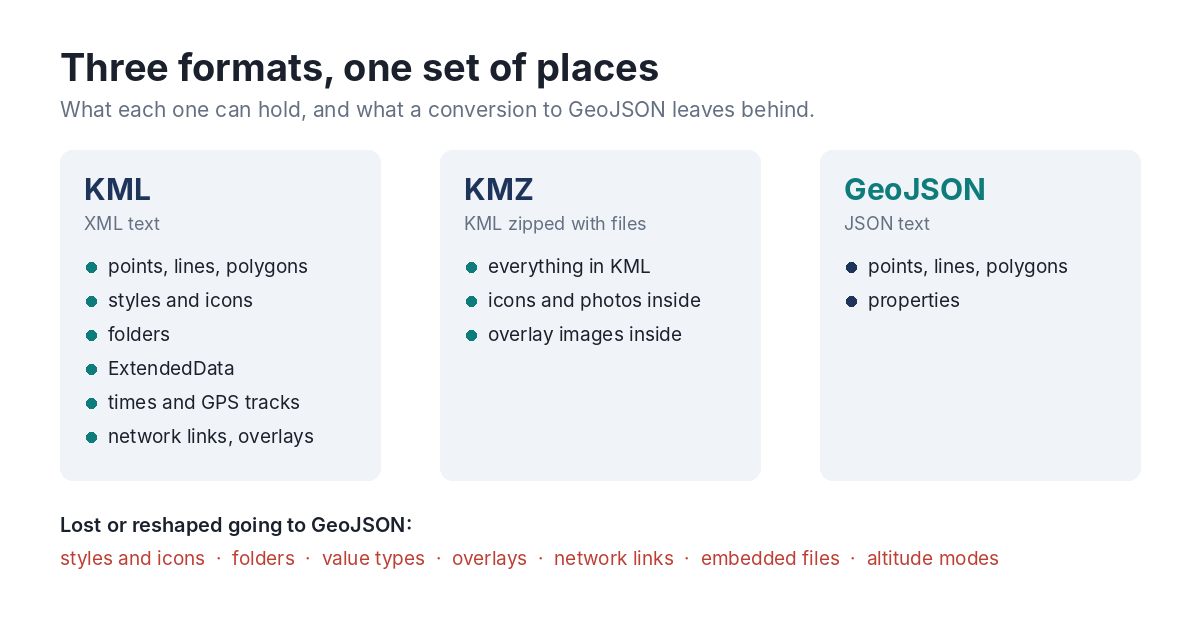
Because it was made for a viewer, KML describes how things look as much as where they are. A KML file holds points, lines and polygons, and also styles and icons, folders to organise them, descriptions in HTML, attribute data (ExtendedData), times and time spans, GPS tracks with a time for every point, image overlays draped over the ground, 3D models, saved camera views, and network links that pull in more KML from elsewhere. Google added its own extensions in a separate `gx:` namespace, and other vendors add theirs.
KMZ: KML With Its Files
A KMZ is a zip archive holding a KML document plus the files it refers to: icon images, photos shown in descriptions, the images of ground overlays. It’s how a KML file travels with its pictures. When the KML inside points at a file that isn’t in the archive, or at a path on the creator’s own computer, those pictures are simply gone for everyone else.
GeoJSON: Data, Not a Drawing
GeoJSON is JSON with a few rules for geometry, standardised as RFC 7946 in 2016. A file is a list of features, and each feature is a geometry plus a bag of properties. It’s simple, it’s what web maps and data tools want, and it deliberately leaves out everything about appearance: no styles, no folders, no overlays, no embedded files.
RFC 7946 also tightened a few things that older GeoJSON files still break: coordinates are always longitude first, in WGS 84 degrees, the `crs` member is gone, and polygon rings have a preferred winding.
Where Data Goes Missing
Put the three side by side and the losses are predictable. Going from KML or KMZ to GeoJSON, a converter has nowhere to put styles, folder structure, the types of attribute values, overlays, network links, saved views, altitude modes or the files inside a KMZ. Some converters keep a few of these in properties; most drop them without a word.
Then there are the problems that were in the file before any conversion. KML writes coordinates as `longitude,latitude`, and people who think in “lat, long” type them the other way round. Rings don’t get closed. Exporters write spaces after commas, which some readers take as separate points. A KMZ is zipped on a laptop that had the icons in a different folder.
An importer meets all of this at once and does its best, quietly. The point of inspecting a file first is to see the list before the importer decides for you.